Incomplete and awaiting-payment submissions
Open Submissions → Incomplete and select the intended Round. This queue includes work that is not yet ready for the review queue. It can be a draft still being edited or complete content waiting for payment.
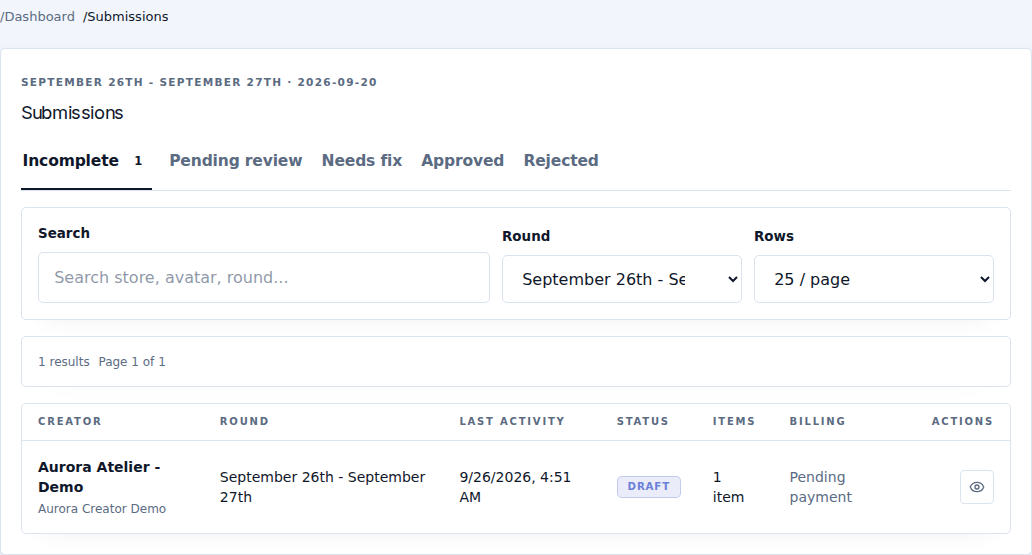
Use Search to find the creator and Rows to change the page size. The table includes creator, round, last activity, status, item count and billing. Open the record and read the specific status rather than assuming every incomplete record has the same problem.
| State | Next action |
|---|---|
| Draft or missing content | The creator completes the required fields and saves/sends the submission. |
| Awaiting payment | Content was saved with Save and await payment. The creator pays the correct round before the payment window closes. It moves to review automatically after confirmation. |
| Locked round | Check the event/enrollment timeline and edit-lock policy. Do not promise that reopening payments also reopens editing. |
Payment confirmation does not invent missing images or submit an unfinished draft. Conversely, complete unpaid content does not become paid because it was saved.
For a legitimate payment problem, inspect Payments before requesting another payment. For a missing required field, point the designer to the submission steps.
An incomplete entry can simply mean the designer is still working. Check the deadline and last activity before sending a reminder.