Rounds: dates, fees and status
Open Rounds. A round is one dated edition of your event. Each has its own participation fee, enrollment window, payment window, submissions and gallery.
Rounds are prepared from the weekly schedule in Settings → Operations. The current interface does not use a separate “Create round” form. Configure the schedule, inspect the resulting round, and enable the appropriate automation for future rounds.
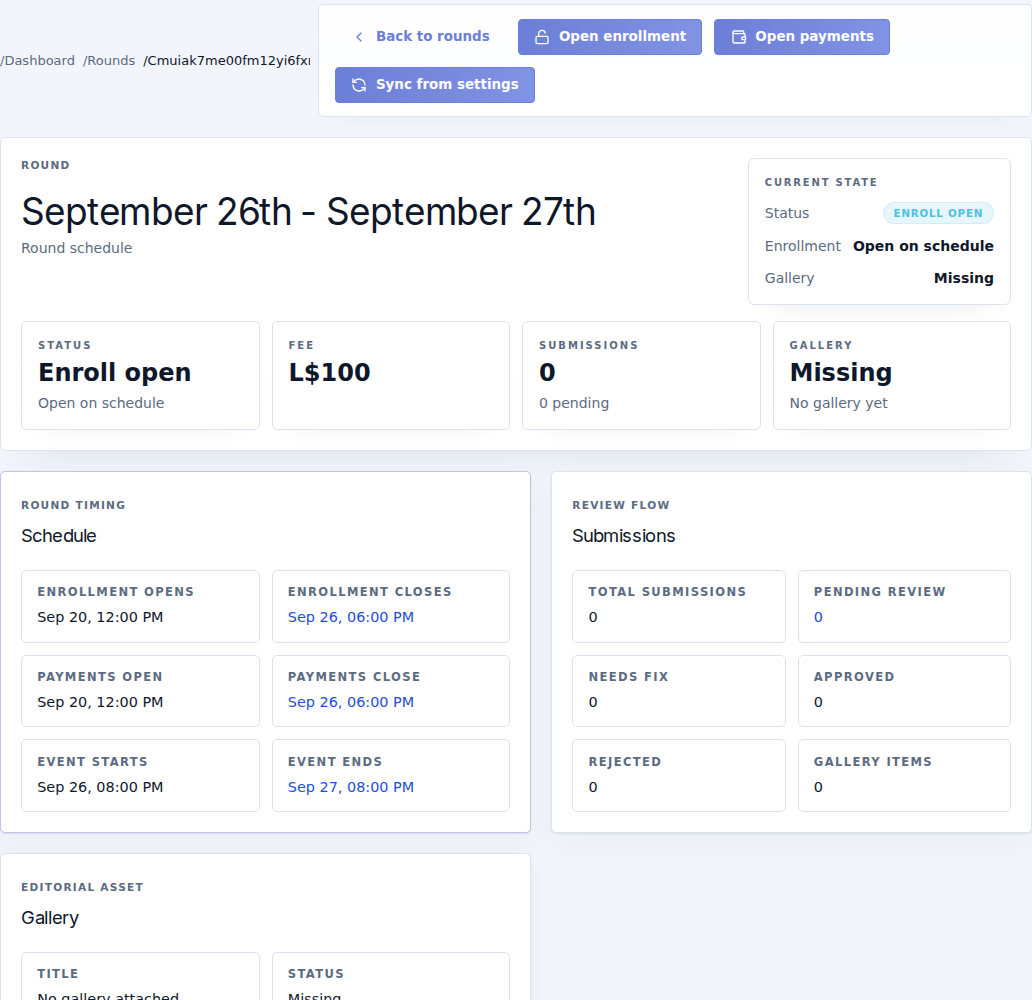
Read the list and details
Select a round's title to open its detail page. Check Status, Fee, Enrollment, submission counts and Gallery, then read all six dated times:
- Enrollment opens and closes.
- Payments open and close.
- Event starts and ends.
Dates use SLT. A round can be Live while enrollment and payments are already closed. These are separate states.
Available actions
| Action | Result |
|---|---|
| Open / Close enrollment | Overrides whether creators can enter that round. The edit-lock policy still matters for existing content. |
| Open / Close payments | Overrides the payment window. It does not erase previous receipts. |
| Sync from settings | Runs round synchronization using current workspace defaults. Inspect the updated dates and fee afterward. |
| Create gallery draft | Prepares the round's gallery for review. |
| Publish | Publishes the prepared gallery when allowed. Create and inspect the draft first. |
| Open gallery editor | Opens the round's cover, metadata and items. |
| Open submissions | Opens the review queue with this round selected. |
A manual override can remain effective after a normal deadline. Use Operations to inspect and reset overrides when returning to the normal schedule.
Before opening a round
Confirm the actual fee, all dated windows, the payment terminal and Server, the submission rules and public instructions. Do not change a fee after collecting payments without checking the recorded charges and the effect on participants.
When no round appears or dates are unexpected, check the saved cadence, automation and current-round status before using Sync from settings. An old browser view is not a reliable reason to repeatedly run operational actions.