Operations settings: access, fee and schedule
Open Settings → Operations. This tab saves the event's defaults. For a temporary override on a particular round, use Operations: live round controls.
Public access
| Switch | Effect after Save access settings |
|---|---|
| Public portal enabled | Allows visitors to open the event's public pages. Turn off during preparation if you want them unavailable. |
| Creator login enabled | Allows creator-side sign-in. Approval and individual account state still determine what the person can do. |
| Applications enabled | Accepts new applications. Turning this off does not delete existing designers or their records. |
These switches have their own Save access settings button. Publishing a homepage does not turn them on.
Billing and verification
| Field | What to set |
|---|---|
| Payment land link | The accessible Second Life map link for your payment area, beginning with https://maps.secondlife.com/…. Test the destination. |
| Default weekly fee (L$) | The participation fee used by the round defaults. Enter a whole L$ amount. Verify the actual fee in Rounds before opening payments. |
| Require creator avatar verification | Requires new applicants to confirm an in-world code before review. Keep the event's Server connected. |
| Enable manager avatar onboarding | Allows designers to invite assistants by avatar name; the assistants finish verification through an in-world link. |
The read-only Verification server and recent verification, manager-onboarding and delegated-payment activity cards help diagnose identity flows. Check the object and last contact when a message does not arrive. They are not fields for entering a script key.
Discord reminders
| Field | Effect |
|---|---|
| Discord deadline reminder (hours) | Lead time before the enrollment deadline, used when the reminder is enabled. |
| Discord opening announcement | Announces that enrollment is available. |
| Discord deadline reminder | Sends the deadline reminder using the lead time above. |
| Discord results announcement | Announces results after the round ends and its gallery is published. |
These require a working Discord connection, route/channel and appropriate template. Enabling a switch alone does not connect Discord.
Round and gallery automation
| Switch | Effect |
|---|---|
| Gallery auto publish enabled | Permits automatic gallery publication when the round's conditions are met. Leave off if the team must approve publication manually. |
| Automation enabled | Enables the workspace's automatic round processing. |
| Auto create next round | Allows the scheduler to prepare subsequent rounds from the saved cadence. |
| Auto open scheduled rounds | Allows scheduled enrollment opening. |
| Auto close expired rounds | Allows scheduled closing when the applicable window ends. |
Automation still depends on platform processing and healthy integrations. Check the live Operations page after changing it.
Set all three windows in SLT
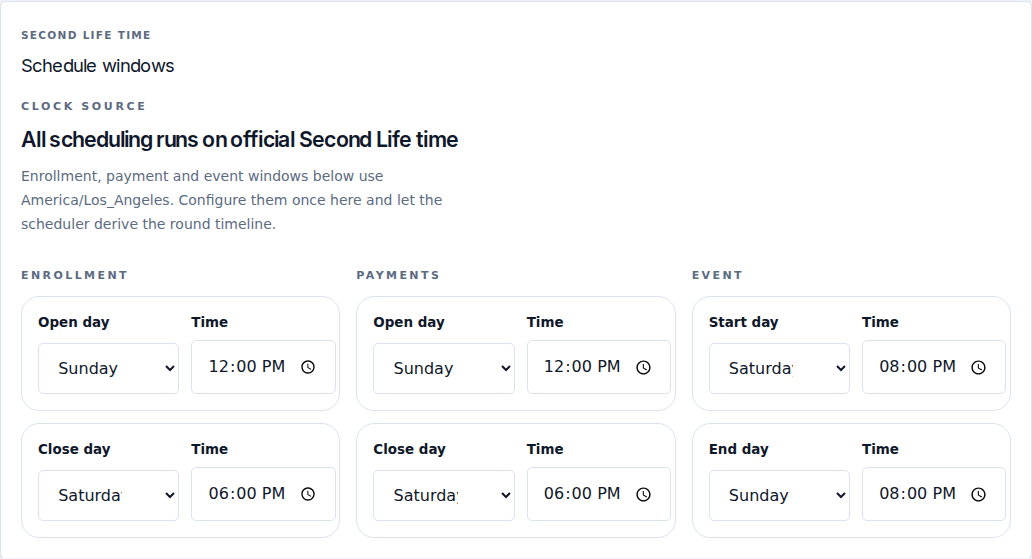
Each row has a weekday and time. SLT follows America/Los_Angeles, including daylight-saving changes. It is not always the same offset from UTC.
| Window | First pair | Second pair | Purpose |
|---|---|---|---|
| Enrollment | Open day + Time | Close day + Time | When designers may enter the round. Editing afterward depends on the submission edit lock. |
| Payments | Open day + Time | Close day + Time | When terminals may accept the round's fee. |
| Event | Start day + Time | End day + Time | The public event period. Also used by the event-start edit lock. |
For example, you might close enrollment before Friday's event start and end the event on Monday. Weekly windows can cross into the next week. Always inspect the dated timeline in Rounds; weekday labels alone can hide a mistaken rollover.
Save and check
- Select Save settings in the header for fee, verification, reminders, automation and dates.
- Open Rounds, inspect the current round and confirm the dated windows and fee.
- When you intend to apply the current defaults, use Sync from settings, then inspect the resulting dates again.
- Confirm that manual overrides are not keeping a window open or closed unexpectedly.
Refresh defaults recalculates defaults from existing history. It is not the ordinary save button and is not just a browser refresh. Review your configuration after using it.