Import audience contacts
Open Audience → Import to add contacts for communication. To migrate approved designers with creator access, use Applications → Import creators instead.
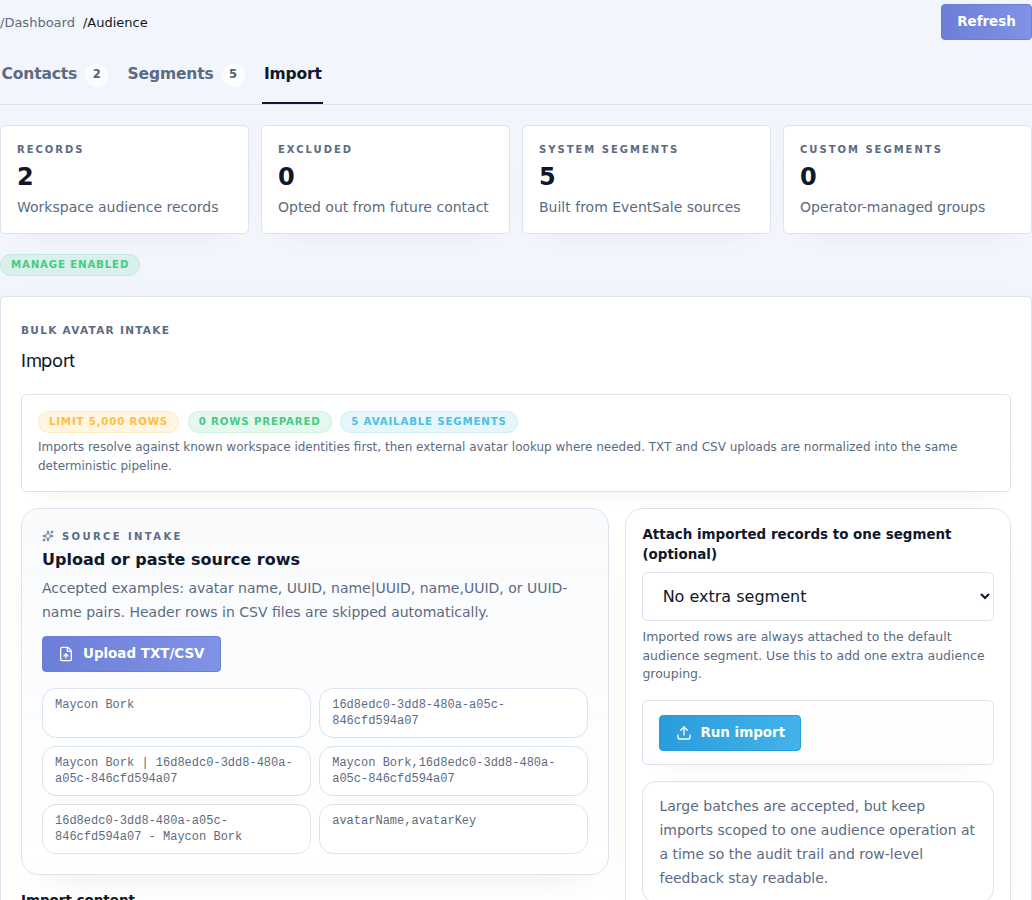
Prepare the content
Use TXT or CSV, one contact per row, up to 5,000 rows. Common supported forms include an avatar name, an avatar UUID, a name plus UUID separated by a comma or |, and CSV with recognized avatar-name/UUID headers.
For example, a simple name list can contain one full username per line. When supplying both name and UUID, make sure they describe the same avatar. Do not include passwords or unrelated spreadsheet columns.
Import
- Choose the TXT/CSV file, or paste the rows into Import content.
- Check the preview text and remove blank or malformed rows.
- Optionally choose Attach imported records to one segment to organize the result.
- Select Run import.
- Read the summary and row-level results before preparing a campaign.
| Result | Meaning |
|---|---|
| Created | Added a new resolved contact. |
| Updated | Matched an existing contact and refreshed permitted information. |
| Duplicates | Repeated identity in the input or an already represented record. Review rather than importing it repeatedly. |
| Unresolved | The system could not identify the avatar. Correct the name/UUID and retry only the affected rows. |
Avatar resolution may take time for a large list. Wait for the current operation instead of launching the same import repeatedly. Check the saved contacts and segment counts afterward.
Importing does not send a marketing message, approve an application, create a password or pay a round fee. It also does not mean every imported person is eligible to receive a campaign.