Connect Second Life marketing Senders
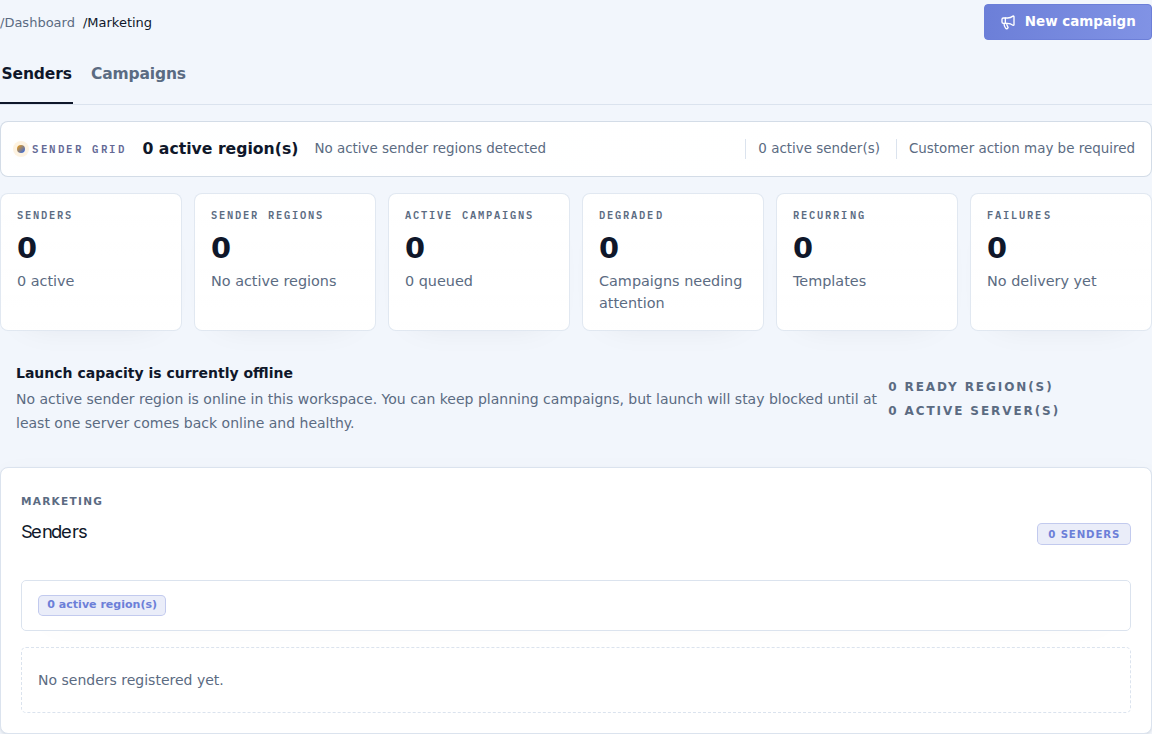
Open Marketing → Senders. The Sender is the in-world object that delivers campaign messages and inventory. It is separate from the event's identity-verification Server and its Payment terminal.
Connect a Sender
- With the event owner's avatar, rez CaveTech - Sender from the supplied package.
- Keep its included Worker in Contents. The Sender manages Workers automatically.
- Use a parcel that permits scripts and the Sender's object rezzing.
- Check that the Sender appears in this workspace with the correct region and recent contact.
- Enable it when the object is ready to deliver.
See object installation for package names and ownership.
Read capacity correctly
The page separates active Senders from active regions. Several objects in one region do not create several independent regions of delivery capacity. A registered object can still be unavailable if it is disabled, has stale contact, lacks a region, or lacks the selected inventory item.
A message-only campaign can use healthy active Senders with registered regions. Inventory delivery also requires the chosen catalog item to be present on eligible Senders. Check the synchronized name, type and item availability before scheduling it.
The Sender's Worker is infrastructure, not a campaign attachment for recipients. Do not remove it to make the catalog look cleaner or insert multiple eligible Worker objects.
Move or retire a device
Disable/pause an object while intentionally removing it from service. After a move, check its updated region and contact before using it again. Remove its registration only when it is retired and no work depends on it.
If the page says Launch capacity is currently offline, you can prepare a draft. Restore a healthy Sender before scheduling delivery. Adding more contacts does not fix unavailable delivery capacity.
Continue with Campaigns to choose content, audience and schedule.