Operations: control the current round
Open Operations for the live status and manual controls of the current round. Use Settings → Operations to edit the recurring defaults instead.
Read before changing anything
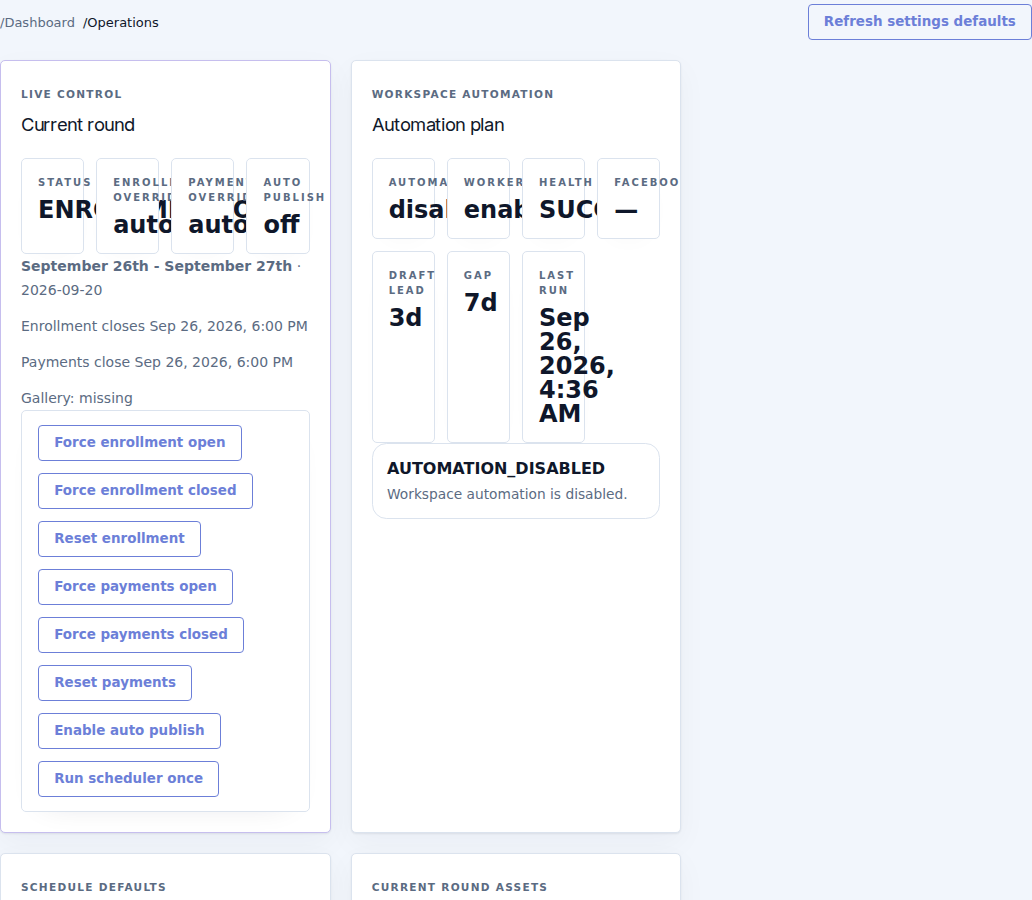
Check the current round title, clock, dated enrollment/payment/event windows, manual overrides, gallery state and automation health. Record what needs changing and which round it affects.
| Control | Effect |
|---|---|
| Force enrollment open / closed | Temporarily overrides enrollment availability. It does not change the event dates or guarantee that already locked content becomes editable. |
| Reset enrollment | Removes the manual enrollment override and returns control to the schedule. |
| Force payments open / closed | Overrides whether the round accepts payments. |
| Reset payments | Returns payment availability to the schedule. |
| Enable / Disable auto publish | Changes the current gallery's automatic publication behavior. |
| Run scheduler once | Processes the current workspace using its saved settings immediately. It is an operational action, not merely a refresh of the screen. |
| Refresh settings defaults | Recalculates defaults from existing history. Check the settings afterward. |
| Ensure gallery | Creates/prepares a missing gallery for the current round. Inspect the resulting draft. |
| Publish gallery | Makes the gallery public when allowed. |
| Unpublish gallery | Takes the gallery out of its published state while retaining the underlying history. |
Example: extend payment time
- Confirm the intended round and current fee.
- Use Force payments open only if you intend to accept late payments.
- Check the terminal's state and the new receipts.
- When the exception ends, use Reset payments to restore the schedule, or deliberately close the window.
This does not reopen enrollment or extend the edit deadline. Address those separately if your event needs them.
If automation looks unhealthy
Check whether automation is enabled in Settings, when it last ran, and the displayed error or summary. Check dependencies such as the gallery, payment terminal and integrations. Do not repeatedly press Run scheduler once to hide a persistent error. Include the round, action, timestamp and exact error in a support request.