Create a Second Life campaign
Open Marketing → Campaigns → New campaign. This sends Second Life messages and, optionally, an inventory item. It is separate from Discord campaigns and Facebook publishing.
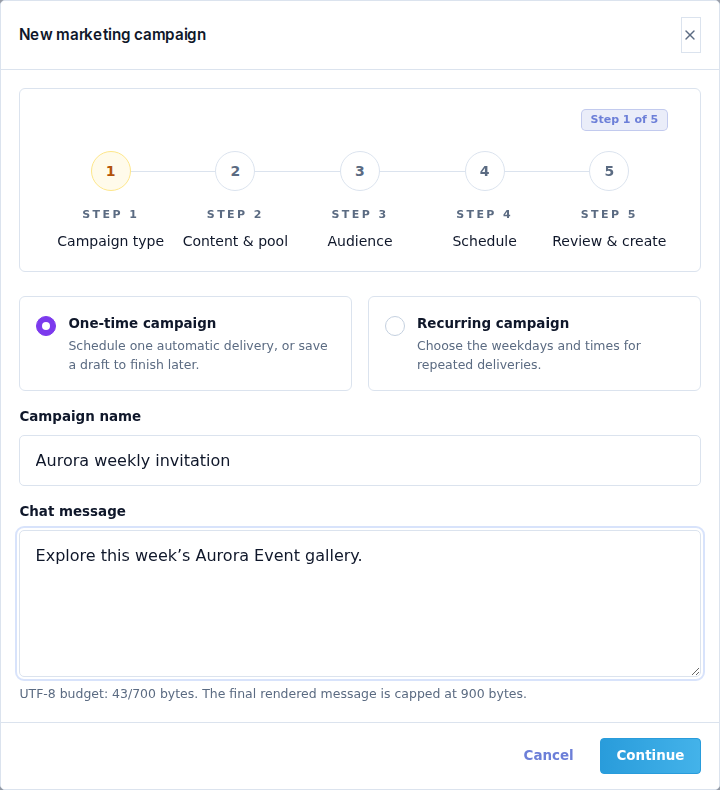
Step 1 — Campaign type
Choose One-time campaign or Recurring campaign. Enter a recognizable Campaign name and the Chat message recipients should receive.
Watch the displayed UTF-8 byte budget, not just the number of characters. Accents and emoji can use several bytes. The usual authored budget is 700 bytes, reserving space for the automatic notice; the final rendered message is capped at 900 bytes. Follow the live budget if the audience policy changes it.
Step 2 — Content & pool
Catalog item is optional. Leave No inventory item for a message-only campaign. Otherwise choose an item already synchronized from the Senders.
Catalog authority and Servers that will be used show the automatic selection. You do not need to pick one source Sender manually for a message-only campaign. For an item campaign, only compatible active Senders carrying the matching item are eligible. Fix a missing item or offline pool in Senders.
Step 3 — Audience
Choose Audience segment and check its size and eligible recipients. The sender-runtime information describes delivery capacity; it is not a recipient selector.
For general or mixed audiences, the unsubscribe notice is mandatory and appended automatically. For designer-only system audiences, Include unsubscribe notice is an available choice and is enabled by default. Suppressed recipients remain excluded either way.
Step 4 — Schedule
For a one-time campaign, choose:
- Schedule automatically: enter Send date (SLT) and Send time (SLT). It runs at that time without leaving the browser open.
- Save as draft: stores the setup without scheduling or sending it.
For a recurring campaign, select the weekdays and choose Same time for all selected days or Different time per day. Set the recurring dispatch time, or each selected day's time, in SLT. Review all enabled weekdays; an unintended day can create an unwanted repeated message.
Step 5 — Review & create
Read the summary: campaign name, mode, item/deliverables, audience, Sender regions, schedule and estimated delivery time. An ETA is an estimate, not a guarantee that every recipient has already received the message.
Use the final save/create action only after the summary is correct. Saving an enabled schedule authorizes future delivery. Use a draft while preparing an untested campaign.
Monitor and maintain
Open a campaign to inspect its run and recipient details. Check queued, processing, completed, cancelled and failed/degraded states as shown. The details can identify a recipient, membership/source context and delivery outcome.
Use the available pause/cancel controls when you intend to stop future work. A duplicate starts a new draft from the setup; it is not a continuation of the original delivery. Delete a campaign only when you intend to remove it and have checked its state.
If delivery is blocked, check healthy Sender regions, item availability, audience eligibility and the specific failure. Do not launch duplicate campaigns to compensate for an unclear result; first identify what was already delivered.