Categories: the choices designers see
Open Settings → Categories. This is the event's shared list of category names, used in applications and round submissions.
| Field or control | How to use it |
|---|---|
| Minimum categories per submission | How many categories a creator must select. Keep this at or below the maximum. |
| Maximum categories per submission | Highest allowed number of selected categories. Keep it within the number of useful choices in your list. |
| Add category | Type one public label, such as Accessories, then use the add action. |
| Allowed submission categories | Review, reorder or remove the listed choices. Drag an item to change its position. |
| Raw category values | Advanced text editing of the same list: one category per line. Do not paste comma-separated names into one line. |
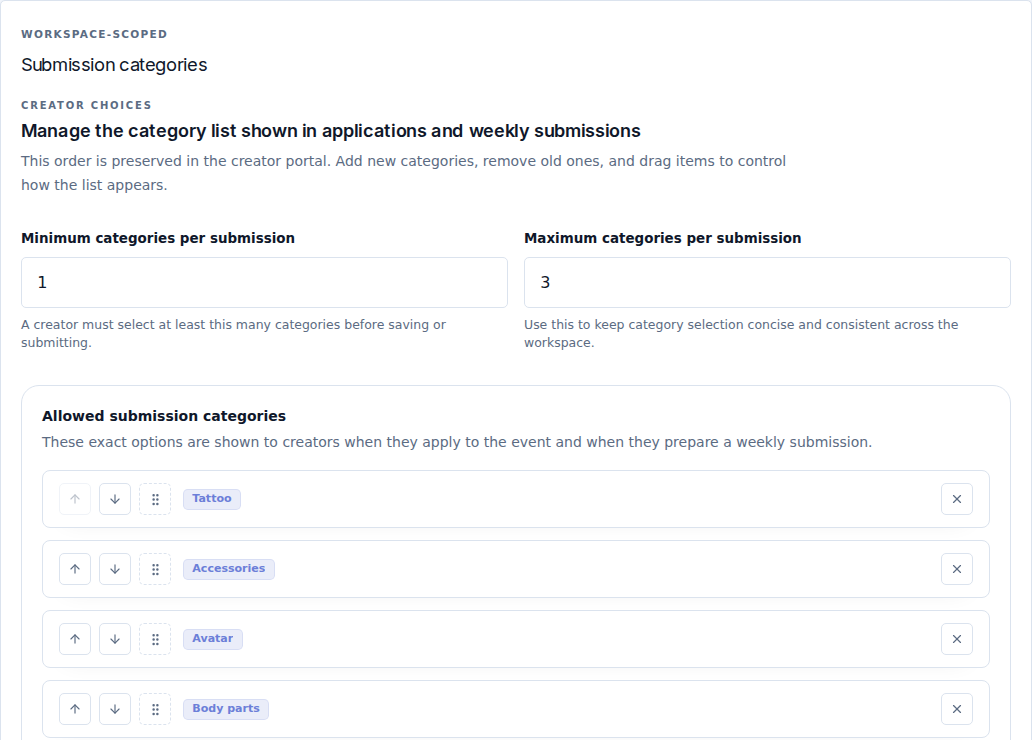
Set up the list
- Start with the categories your event actually accepts.
- Remove empty or duplicate labels and use consistent spelling.
- Put common categories first by dragging them.
- Set the minimum and maximum selections. For a designer choosing one or two categories, use
1and2. - Select Save settings in the page header.
- Preview the application and check the creator submission page.
Expected result: creators see the saved names in the saved order. Setting a minimum greater than the number of available categories makes the form impossible to complete; correct the list or the limit before accepting applications.
Changing a category label after designers have used it can make old and new records look inconsistent. Prefer stable names, and review current submissions after a significant category change.