Submission policy: required content and limits
Open Settings → Submission policy. These are the rules creators see when applying and preparing round content. Set them before inviting designers, then select Save settings in the page header.
Product and upload limits
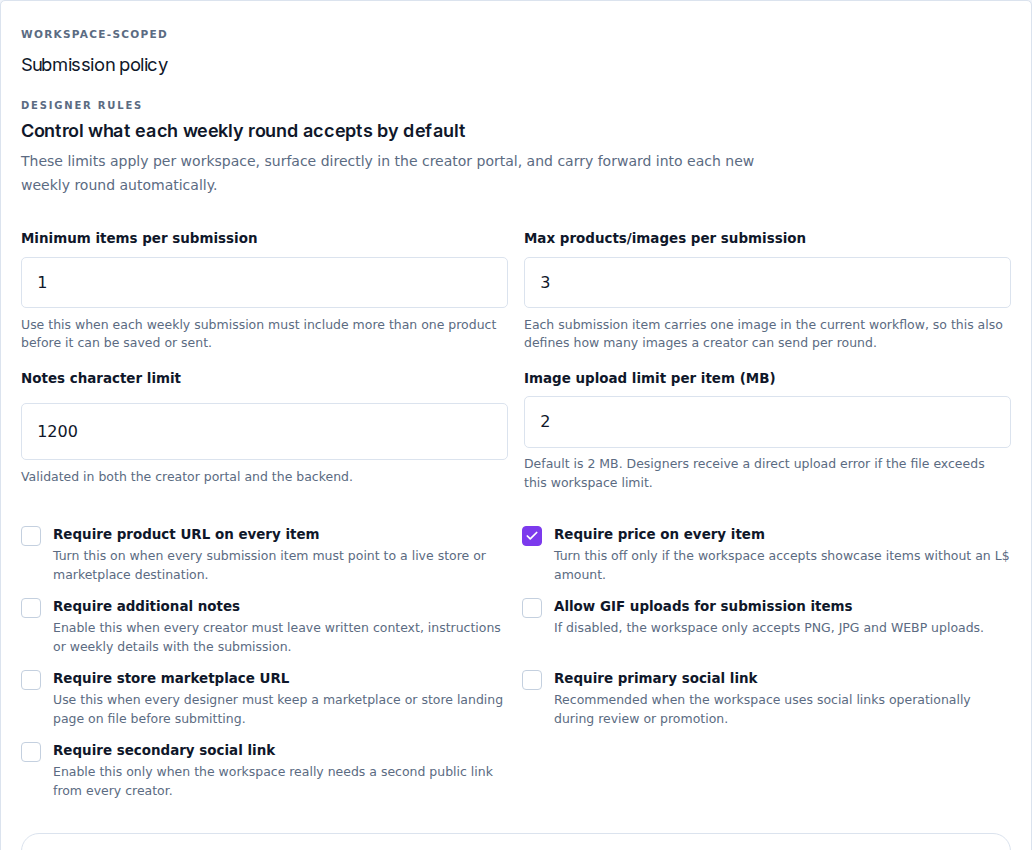
| Field | Meaning and example |
|---|---|
| Minimum items per submission | Smallest accepted number of products. For one to three products, enter 1 here and 3 in the maximum field. |
| Max products/images per submission | Highest accepted number. Each product item has one image, so this also limits the number of item images. Keep it at least as large as the minimum. |
| Notes character limit | Maximum length of the creator's additional notes. The portal and server enforce the same limit. |
| Image upload limit per item (MB) | Maximum file size for each product image. The initial value is 2 MB; the supported policy range is 1–8 MB. This is a file-size limit, not a width or height in pixels. |
Submission images must also be 4096 pixels or smaller on each side, regardless of the MB limit.
Use whole numbers and correct any validation message before saving. The values shown in a screenshot are examples, not a mandatory setup for your event.
Requirements for weekly submissions
| Switch | When enabled |
|---|---|
| Require product URL on every item | Every product needs a destination link. |
| Require price on every item | Every product needs its L$ price. This is the product's price, not the event's participation fee. |
| Require additional notes | A creator cannot leave the submission's notes empty. State what you expect in the event's instructions. |
| Allow GIF uploads for submission items | Allows GIF in addition to PNG, JPG and WebP. Leave off if you only want still images. |
| Require store marketplace URL | Requires the creator's store/Marketplace destination for the submission. |
| Require primary social link | Requires one main public social or portfolio destination. |
| Require secondary social link | Requires an additional public destination. Enable only if you need two. |
Requirements for applications
The Application form group applies before a designer is approved. Its switches are Require brand name on application, Require store SLURL on application, Require store marketplace URL on application, Require primary social link on application, and Require secondary social link on application. Each makes that specific answer mandatory before review.
An application requirement and a weekly-submission requirement are different settings. For example, making a second social link mandatory for applications does not explain to an already approved designer what must be included in this week's submission.
Decide when edits stop
Submission edit lock has two choices:
- Lock on event start: an existing submission can remain editable after enrollment closes, until the event starts. This does not reopen enrollment for a new submission.
- Lock on enrollment close: editing ends at the enrollment deadline.
The current round status, submission state and the creator's permissions can also restrict an action. The portal displays the reason when content cannot be changed.
Check your saved policy
Select Save settings, then review the creator form and the current round. New rounds inherit the workspace policy. If an already prepared round still shows an older setting, inspect it before using Sync from settings; that action also applies schedule/default changes.
Set the allowed category names and selection limits in Categories. Explain unusual requirements in the application text and homepage FAQ so creators can prepare the right files before starting.