Customize the application form
Open Applications → Layout. This is the form designers fill in to join your event. Edit the wording and supporting fields, then use Preview layout before Save changes.
Overall appearance
| Control | What it changes |
|---|---|
| Banner upload / clear | The image at the top of the application. |
| Card width | Form-card width, from 420–780 px. Check the narrow preview too. |
| Accent | Highlight color. |
| Button text / Button background | Primary action colors. Keep the label readable. |
| Use gradient on primary button | Shows Gradient from and Gradient to: choose the starting and ending colors of the primary button. |
| Show site header | Displays the event navigation above the application. |
| Show left creator access column | Displays the companion creator-access area. |
| Use steps | Presents onboarding in stages. Turning it off displays the fields together; it does not bypass identity validation. |
| Eyebrow / Page title / Description | Introductory text above the form. Explain who can apply and what to prepare. |
Edit a block
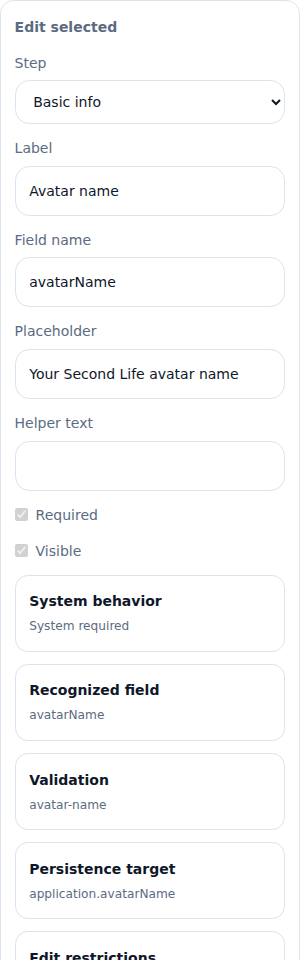
Select a block in the form preview. Its controls appear under Edit selected.
| Field | How to use it |
|---|---|
| Step | Chooses the stage containing the selected block, where moving it is allowed. |
| Title / Text | Content of a title, text or requirements block. |
| Label | The visible question on an input field. |
| Field name | The stored identifier for an additional field. Keep it stable after collecting answers. Native fields protect this identifier. |
| Placeholder | A short example inside an empty input; it does not count as an answer. |
| Helper text | Instructions displayed with the field, such as an accepted URL format. |
| Required | Requires an answer, when the field's system rules allow this to be changed. |
| Visible | Shows or hides the block, where permitted. |
| Edit options | For a select field, edit each option's visible Label and stored Value, add/remove options and reorder them. Keep at least one option. |
The Inspector also explains System behavior, Recognized field, Validation, Persistence target and Edit restrictions. These are descriptions of what the field does, not extra answers for the applicant. A recognized field can update the designer's profile; a custom answer is additional information.
Use the palette to add supporting blocks and drag permitted blocks into position. Add step below and Remove step apply only where allowed. Locked identity, verification and password controls cannot be removed or made optional to bypass the system's flow.
Instructions, terms and completion messages
| Field | Suggested content |
|---|---|
| Benefits | What participation includes. |
| Requirements | Eligibility, required links, and any preparation needed. |
| Success message | Explain that the application was received and what happens next. Do not promise automatic approval. |
| Closed message | Explain that applications are closed and where to ask for help. |
| Terms label | The short clickable title, such as Aurora Event terms. |
| Terms content → Edit formatted terms | The actual event rules, entered through the formatted-text editor. Preview the result. |
| Submit text | The final button label. Use a clear action such as Send application. |
Save and test
- Select Preview layout and inspect every stage.
- Select Save changes and wait for confirmation.
- Use Open live page or the copied application URL.
- Check the public form while signed out, including its required fields and terms link.
Restore defaults replaces the edited layout with the default form. Review before saving it. Required application links are also controlled by Submission policy; the visual editor does not override those rules.