Schedule Discord campaigns
Open Discord → Campaigns → New campaign. Create the template and map its route in Connection first.
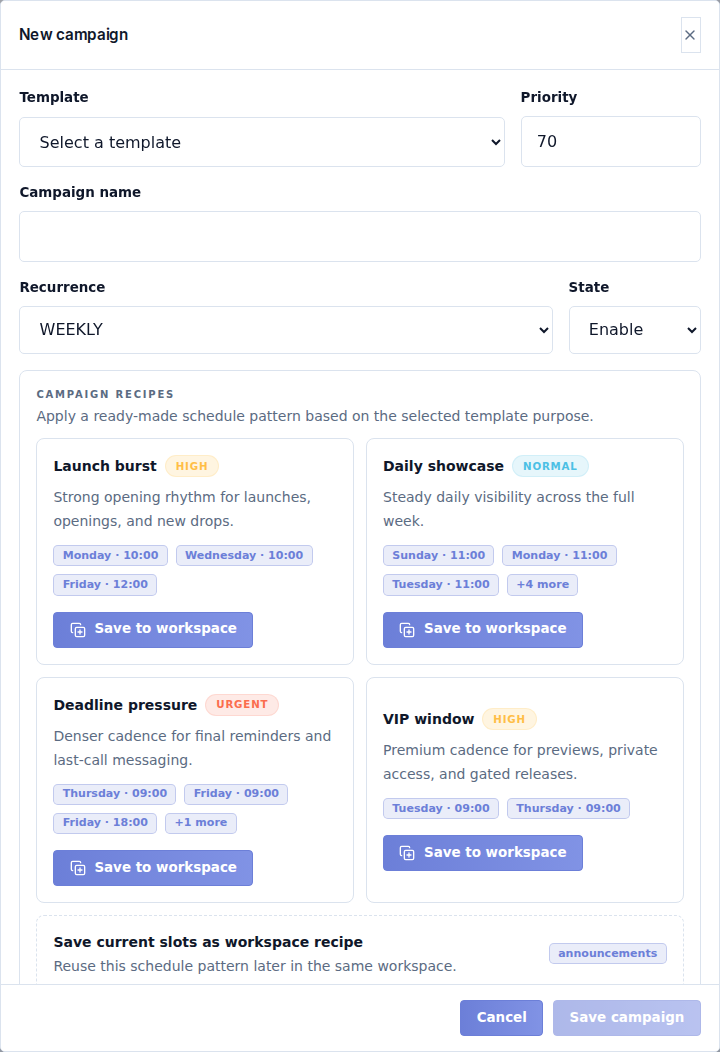
Main fields
| Field | What it controls |
|---|---|
| Template | Reusable message to send. Check its enabled state, type and route. |
| Priority | Order when work is due together; lower numbers run first. |
| Campaign name | Internal name that explains this schedule. |
| Recurrence | Once for one dated send or Weekly for repeating weekday/time slots. |
| State | Enabled allows the schedule to run. Use Disabled while preparing it. |
For Once, set the date/time fields shown by the form. For Weekly, use Add weekday and time and set each slot's weekday and time. Remove unwanted slots. Times are labeled SLT; check the date and upcoming occurrence before enabling.
Recipes
Starter recipes provide patterns such as launch, showcase, deadline, payment or VIP messages. Applying one fills schedule choices; it does not prove those times suit your event.
To store a reusable workspace recipe, use Save to workspace and fill Recipe name, optional Internal note, and the applicable Purposes. Purposes are announcements, submissions, payments and marketing. Select Save workspace recipe, then review the campaign's actual slots.
Save and monitor
- Check the template preview and destination route.
- Review the recurrence, every date/day/time and priority.
- Select Save campaign.
- Enable the campaign when you intend it to run.
- Check Delivery log after a scheduled time.
The browser does not need to remain open. A scheduled time is not proof that Discord accepted the message. If delivery fails, inspect the route, runtime, template and log before creating another campaign for the same announcement.
Disable or remove schedules that are no longer needed. Changing a schedule affects future work; it does not retract a message already posted.