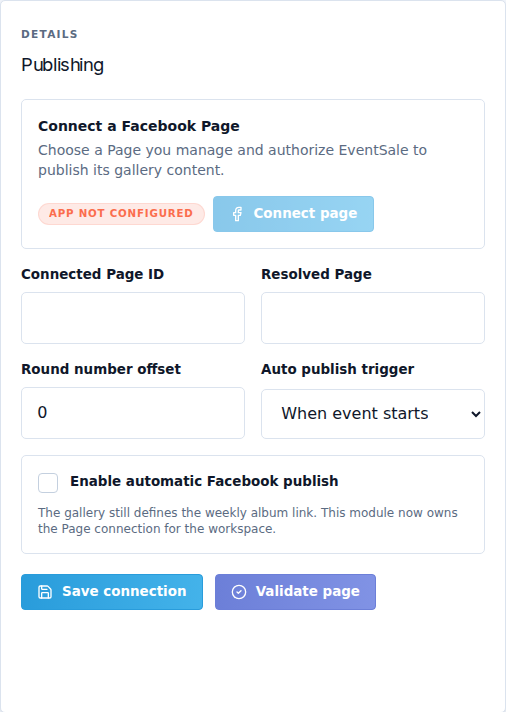
Connect a Facebook Page
Open Facebook → Connection. EventSale publishes gallery content to a Facebook Page you manage. It does not create a Facebook Page or use a Facebook group as the gallery destination.
App not configured means CaveTech's Facebook application is not configured for this environment. You cannot fix that by entering a Page ID alone. Contact CaveTech and continue using the EventSale public gallery while connection is unavailable.
Authorize and select the Page
When available, select Connect page, complete Facebook/Meta authorization and choose the Page you intend to use. If several Pages are returned, select Use this page beside the correct one. Check its name and ID before confirming.
Use Reconnect page when authorization needs renewal. Disconnect page stops this workspace from using the connection; it does not delete content already posted on Facebook. Never paste a private Facebook access token into a public URL or description field.
Connection fields
| Field or control | What it does |
|---|---|
| Hero asset / Choose cover | Default cover image. JPG, PNG or WebP, up to 10 MB. Save the connection after uploading. |
| Clear cover | Removes the default cover. |
| Default description | Text used when a gallery has no description override. Supports line breaks and emoji. |
| Connected Page ID | Identifies the connected Page. Prefer the result of authorization; manually typing a number does not grant publishing access. |
| Resolved Page | Shows the Page resolved by the connection/validation. Confirm it is the intended event Page. |
| Round number offset | Adjusts numbering used in the published title to match an event whose numbering started before EventSale. |
| Auto publish trigger | When event starts or After round closes. |
| Enable automatic Facebook publish | Permits automatic publishing with the selected trigger, once the other requirements are met. |
Select Save connection, then Validate page. Read the Validation snapshot: connection state, last validation, validated Page ID/URL, validation error and last delivery. A saved configuration with a validation error is not a ready connection.
Supply the album for each round
A connected Page is a workspace setting. The Weekly album link belongs to an individual gallery. Create/choose the round's album on that Page, save its link in the gallery editor, and check validation before Publish to Facebook.
Keep automatic publishing off while preparing the connection. Make one intentional manual publication when you are ready, inspect the actual album and Delivery log, then enable automation if desired. A manual publication is a real external post, not a preview.