Apply to an event as a designer
Use the application link supplied by the event owner. Each event has its own creator records and rules. The owner's private CaveTech dashboard is not the designer's application page.
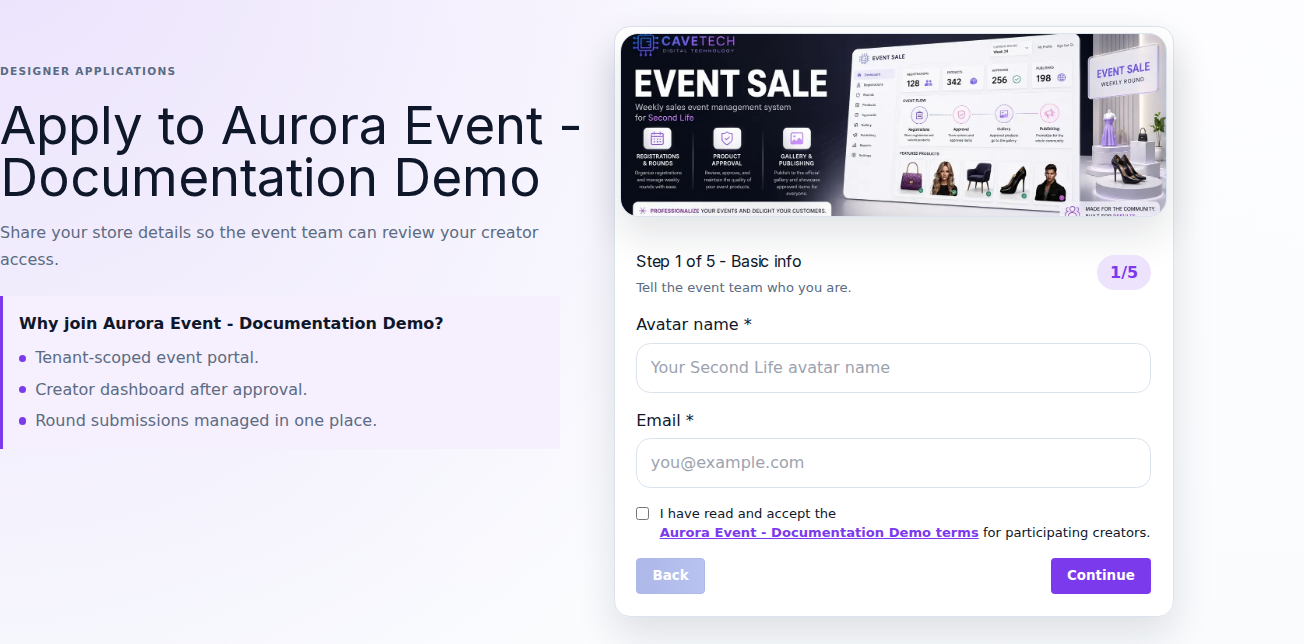
Before applying
Have your exact Second Life avatar username, email, store/brand name, store SLURL, and any required Marketplace or social links ready. Log in to the matching Second Life avatar so you can receive verification. Read the event's requirements and terms.
Complete the form
The event can customize labels and supporting questions. A standard application uses these stages:
- Basic info: enter avatar name and email, and accept the event's terms after reading them.
- Verify code: enter the code sent to your avatar by this event's Server. Follow the page's expiry/resend instructions.
- Store details: enter the requested brand/store information and location links. Answer any additional event questions.
- Social media: supply the public links required by this event. Optional fields may be left empty.
- Creator password: create and confirm the password for this event's creator portal, then send the application.
Use Continue to validate each stage and Back to review an earlier one. Required fields are marked on the form. Turning off the visual step layout does not remove required identity checks.
Creator passwords require at least 8 characters, one uppercase letter, and one special character. Do not reuse your Second Life password.
After submission
Wait for the event team's decision. The success message confirms receipt of the application, not approval of your store or payment of a round fee. Sign in through this event's creator login to view the available status and next action. Full round participation requires approval.
If the event imported your already approved application, use First access for an imported creator instead of applying again.
Common blocks
- Applications closed: contact the event through its published support channel or wait for the next intake.
- Code missing: check that you used your username, are logged in to that avatar, and can receive its messages. The owner should check the Server connection.
- Email/avatar already registered: try this event's login or password recovery.
- Link opens the wrong login: ask for the complete event-specific application/login link. A generic
/creatorpage is not a substitute.
After approval, continue to the creator portal.