Import existing approved creators
Open Applications → Import creators when migrating designers you have already accepted. This is different from importing a marketing contact list.
Apply approved applications creates approved application records. It does not send them to the ordinary Pending review queue, and it does not give a person a usable password. Each imported creator must complete first access through Second Life verification.
Prepare the spreadsheet
Supported files: CSV, TSV, XLSX and ODS, up to 10 MB and 10,000 rows. PDF, HTML and old XLS files are not supported. Export the actual spreadsheet data, not a web page or screenshot.
Use one designer per row and a header row. Do not include passwords, verification codes, or payment-card details. Preserve accurate avatar identity and email information.
Preview and map the columns
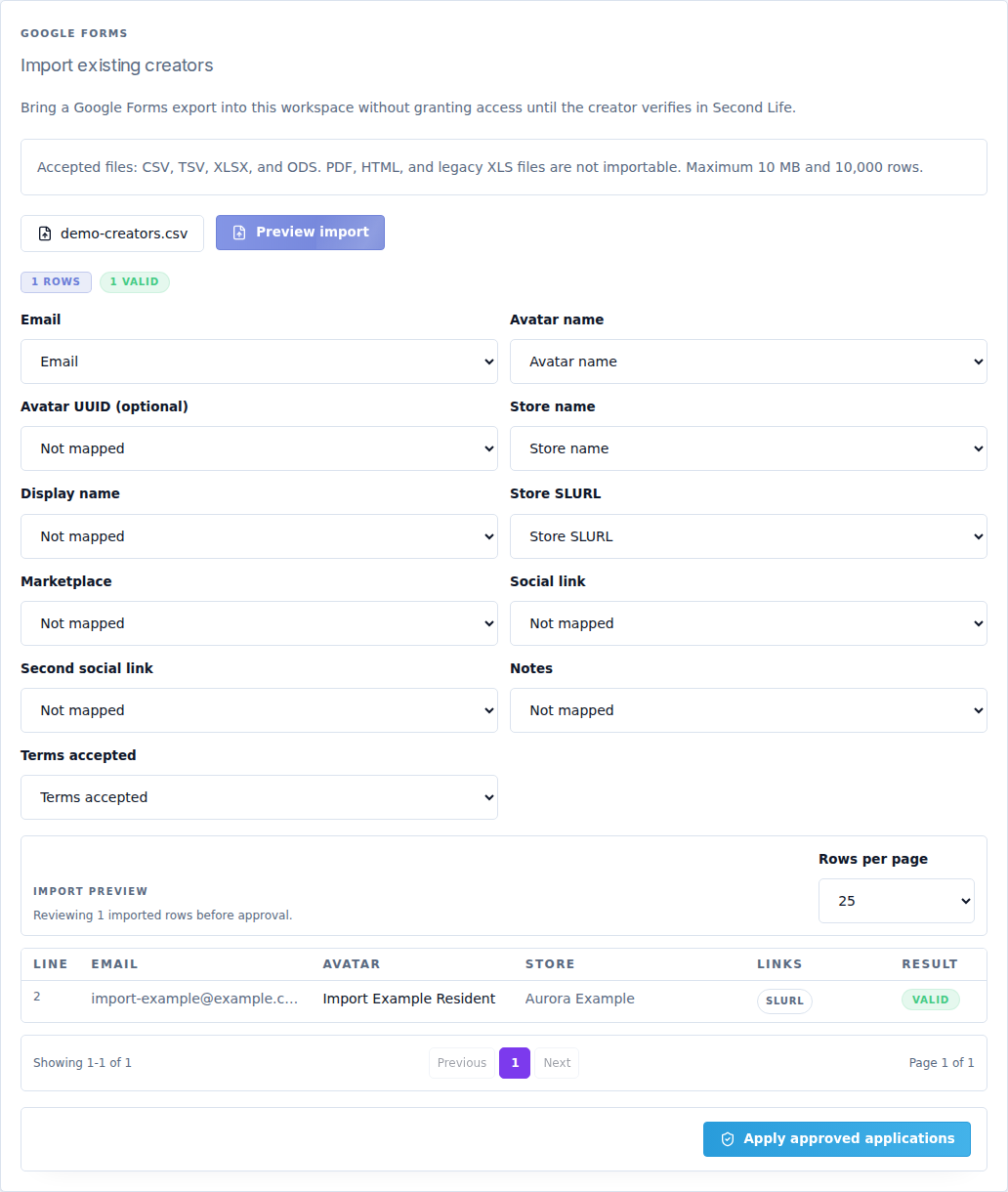
- Select Choose export file and choose your file.
- Select Preview import. This step checks the file; it does not activate creators.
- Review each mapping below. A source column should only map to its intended destination.
- Read the result for every invalid or duplicate row. Correct the source or mappings and preview again as needed.
| Destination field | Expected content |
|---|---|
| Designer's valid email address. | |
| Avatar name | Exact Second Life username. |
| Avatar UUID (optional) | Full avatar UUID if known. It must match the intended designer. |
| Store name / Display name | Brand name and preferred displayed name, respectively. |
| Store SLURL | In-world store location link. |
| Marketplace | Public Marketplace/store URL. |
| Social link / Second social link | Public portfolio or social destinations. |
| Notes | Existing application context for your team. |
| Terms accepted | The source field recording acceptance. Do not map an unrelated “yes/no” answer to this. |
Use Rows per page and the pagination controls to review the whole file. The preview identifies valid, duplicate and invalid rows. A matching email or avatar already in this workspace is not a new designer to approve again.
Apply the import
Select Apply approved applications only after confirming that the file contains designers you intend to approve. Read the created/skipped/invalid results, then check Applications → Approved. Re-importing is not a way to overwrite arbitrary existing records.
First access for an imported creator
Give the creator your event's public login link. They should:
- Enter their avatar name or email.
- Select First access for an imported creator.
- Receive the in-world code from the event's CaveTech - Server.
- Enter the code in the browser.
- Create and confirm their first password, then select Activate account.
- Sign in to the event's creator portal.
The Server must be connected. If the imported identity was mapped incorrectly, resolve that record before repeatedly requesting codes for the wrong avatar. Importing creators does not mark their round fees as paid or import past submission approvals.