Rounds
Rounds are the calendar backbone of EventSale. Each one represents a release of your event with its own creator enrollment, payment window, event dates, fee, status, and gallery.
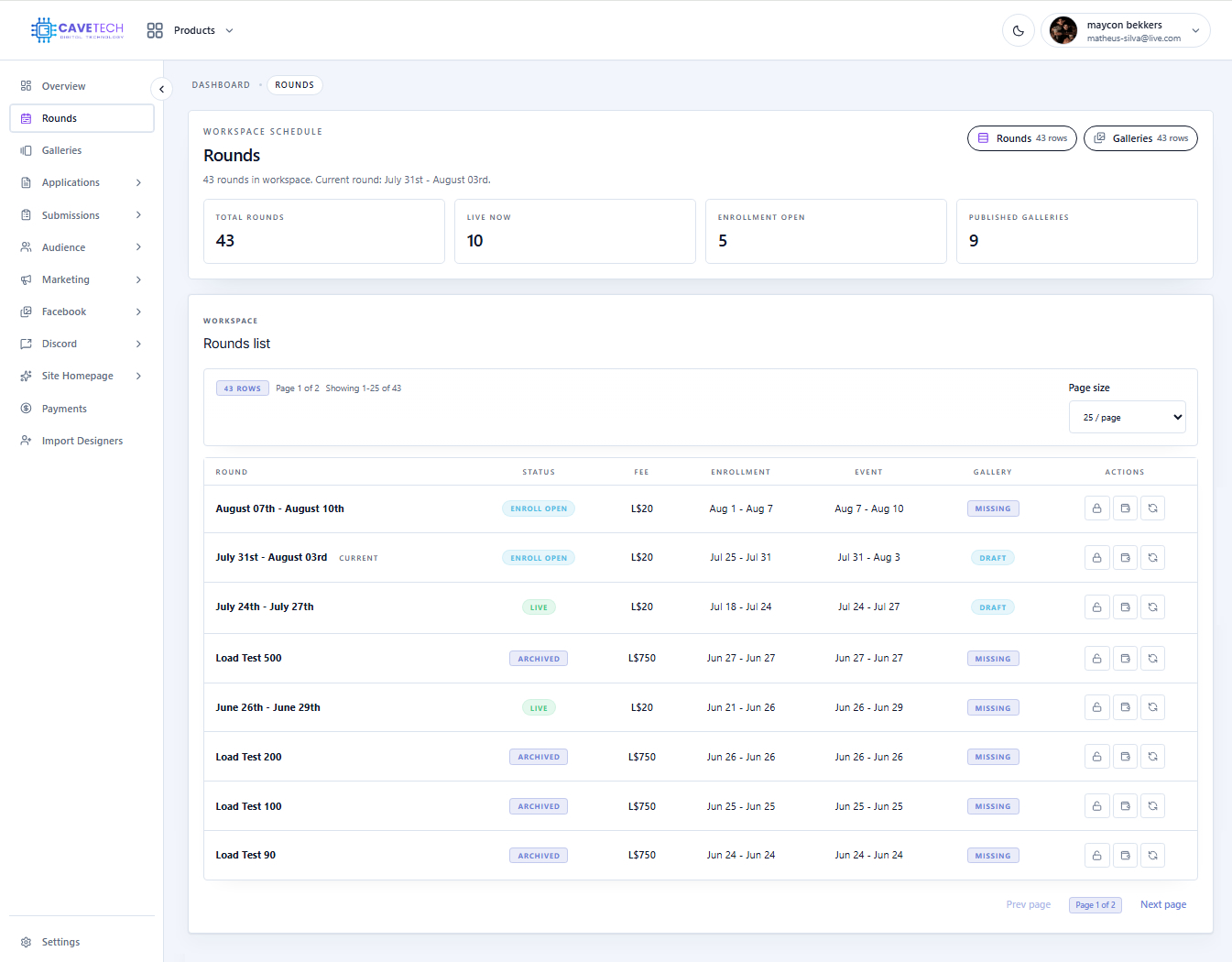
Read the list
The table shows the round, status, fee, enrollment dates, event dates, gallery state, and available actions. The common statuses are:
- Draft — still being prepared.
- Enroll open — creators can submit to the round.
- Enroll closed — new enrollment is closed.
- Live — the event period is active.
- Archived — the round is kept as history.
The gallery column separately shows Missing, Draft, Published, or Unpublished. A live round and a published gallery are different things: one describes the event period, the other describes the public product collection.
Opening and closing windows
Use the enrollment action only after checking the dates and submission policy. Opening enrollment allows creators to submit; closing it stops new submissions. The payment action controls whether payment terminals accept the round immediately. These actions ask for confirmation because they affect creators in Second Life.
Use Sync round from settings when you intentionally want the round to use the current workspace schedule defaults. Review the result afterward; synchronization is a deliberate change to the round dates.
A reliable round routine
Prepare the round and dates first, then open enrollment. Review applications and submissions, check payments, close enrollment at the right time, prepare the gallery, and publish the gallery only after the content and links are correct. Archive the round when it is finished so it remains available in previous-round history without looking active.