Connect Second Life Marketplace
Marketplace ANS sends new sale notifications to your Vendor account. Open Finance → Marketplace to configure it.
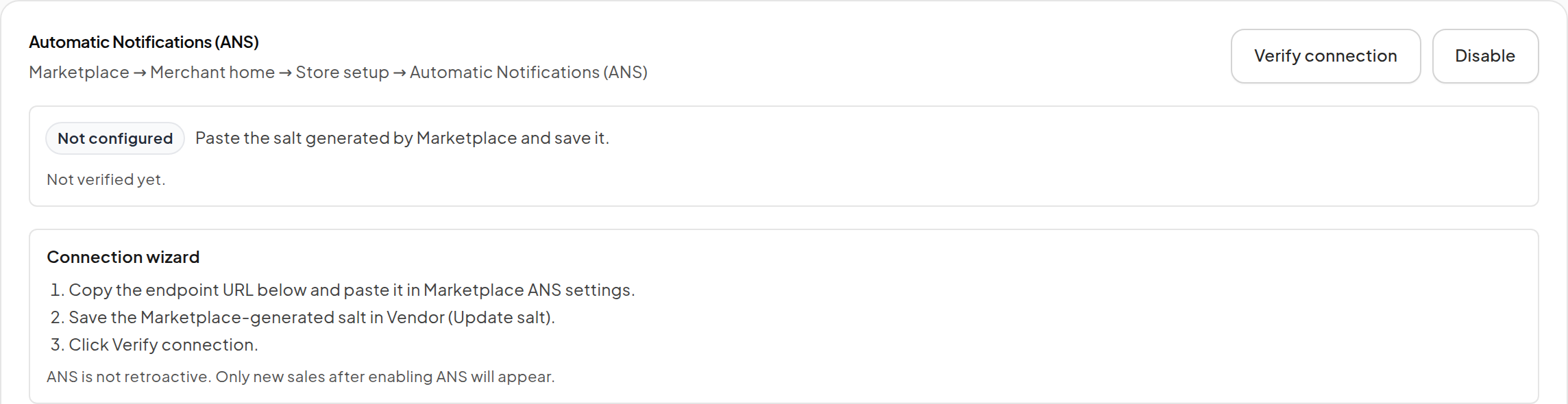
Step 1: Copy your endpoint
- Sign in to your Vendor account.
- Open Finance → Marketplace.
- Under Endpoint URL, click Copy endpoint URL.
Use the URL from your live account. Do not copy an example URL from documentation or another store.
Step 2: Set the Marketplace notification URL
- Sign in to Second Life Marketplace as the merchant.
- Open Merchant home and find Automatic Notifications (ANS).
- Paste the Vendor endpoint as the notification URL and save it.
- Copy the Merchant Salt generated by Marketplace.
Marketplace generates a new salt when the notification URL changes. Its current setup location is illustrated in the official ANS configuration guide.
Step 3: Save the salt in Vendor
- Return to Finance → Marketplace.
- Click Update salt.
- Paste the Marketplace-generated value and save it.
- Click Verify connection.
- Confirm the connection status and last verification shown by the page.
Keep the salt private. If you change the notification URL later, update the salt here too.
Step 4: Confirm new notifications
After a new Marketplace sale, check the connection's last-received information and Latest Marketplace sales. Use Finance reports to reconcile the recorded gross and fee amounts.
ANS is not retroactive. Enabling it does not fetch all previous orders. To bring older purchases into Vendor, use Sales history import.
Notifications, Product mapping and redelivery
A notification is not permission to send a second copy immediately. Marketplace delivery state, the actual recipient and the catalog mapping matter for purchase recovery.
Review any unmatched or ineligible record. Do not substitute the payer for the recipient of a gift. Imported, reconciled purchase history can support recovery when its recipient, delivery state and Product mapping meet the rules.
Disconnect or troubleshoot
The page offers Disable for the connection. If notifications stop unexpectedly, check the enabled state, endpoint, current salt and last verification first. Re-enabling the connection does not backfill the interruption.
Keep a transaction reference when contacting support, and share neither the salt nor an authenticated account link.